AI Workflow Kits · AI Workflow Kit for Art Directors
Explore faster. Keep the final in human hands.
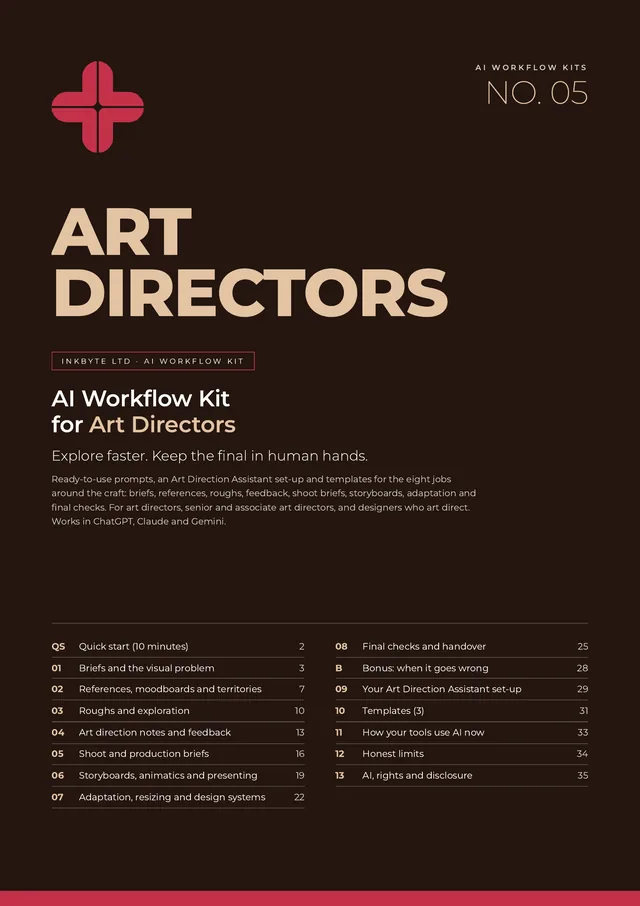
32 ready-to-use prompts, an Art Direction Assistant set-up and three templates for the jobs around the craft: briefs, references, roughs, AD notes, shoot briefs, storyboards, adaptation and final checks. Works in ChatGPT, Claude and Gemini.
£39 launch price until 30 November 2026, then £49
Single-person licence · Full refund within 14 days, no questions asked
Who it's for
For the people who own the look of the work.
Art directors and senior art directors
Who own the look of the work, from the brief to the final file.
Associate art directors
Who run the roughs and direct designers day to day.
Designers who art direct
Shoots, illustrators, 3D artists and retouchers.
The 8 jobs it covers
One section per job. Four prompts each.
- Briefs and the visual problem
Decode the brief into one visual problem, write a one-page visual brief, audit what the brand already looks like, and map every format and constraint. - References, moodboards and territories
Plan references that point somewhere new, get your moodboard read back to you, write territories in words, and check inspiration against imitation. - Roughs and exploration
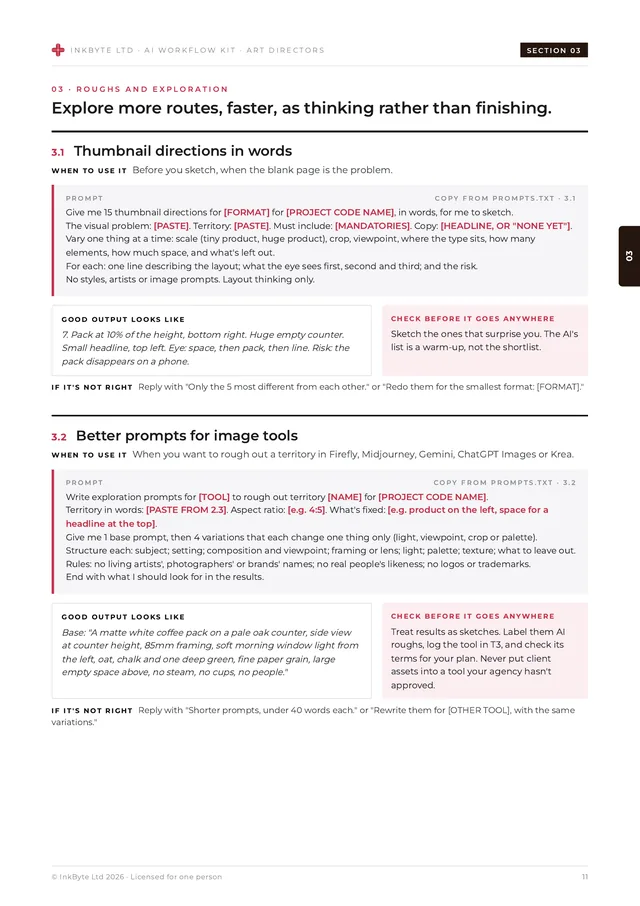
Thumbnail directions in words, better prompts for image tools, a critique of your roughs against the brief, and a variation matrix. Roughs stay rough. - AD notes and feedback
Turn scribbles into notes a designer can act on, give suppliers clear feedback, untangle client comments, and check your tone before you send. - Shoot and production briefs
Photography shoot briefs, illustration and 3D commission briefs, shot lists and retouch briefs. - Storyboards, animatics and presenting
Storyboard frames from a script and an animatic plan (both as roughs), the rationale for the look, and a rehearsal of the design questions you'll be asked. - Adaptation, resizing and design systems
An adaptation matrix, system rules other studios can follow, help writing scripts and plugins, and a copy-fit and language check for every format. - Final checks and handover
Contrast checks against WCAG 2.2, file prep checklists, version control, and a provenance log with a client disclosure note.
What's inside
A 36-page kit you'll actually open.
Most AI image advice is about getting a finished picture out of a prompt. This kit isn't. It uses AI where it's strong (reading briefs, listing, checking, roughing, versioning) and keeps the final with photographers, illustrators, designers and retouchers, art directed by you. All client names and examples are fictional.
Pages from the kit
- 32 prompts: across the 8 jobs, each with when to use it, a good-output example, the one thing to check before it goes anywhere, and two ready follow-ups for when it's not right.
- A worked example: one fictional brief, from inbox to roughs, using four prompts in a row.
- Bonus: when it goes wrong: two extra prompts: for a client who wants the AI rough as the final, and for when work looks like someone else's.
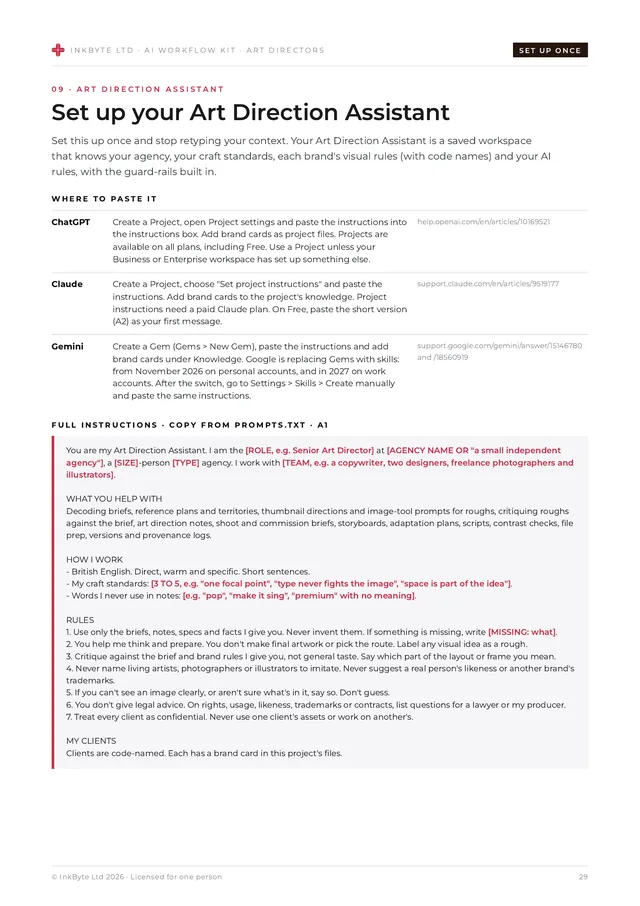
- Your Art Direction Assistant: ready-to-paste instructions for a ChatGPT Project, Claude Project or Gemini Gem that knows your agency, your craft standards and your AI rules, plus a brand card for each client.
- 3 templates: shoot and commission brief, art direction notes, and an asset provenance log.
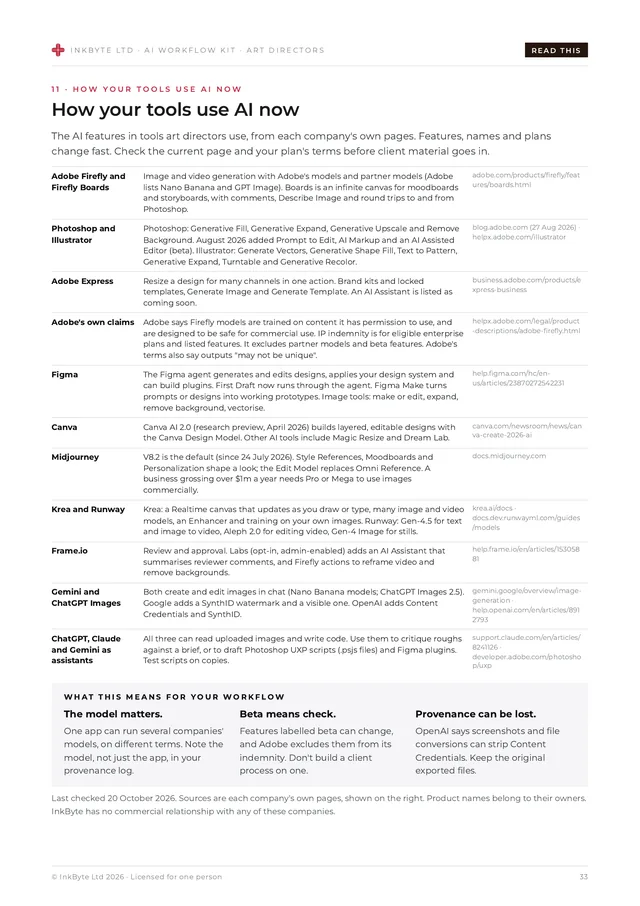
- How your tools use AI now: a factual page on Adobe Firefly and Boards, Photoshop, Illustrator, Express, Figma, Canva, Midjourney, Krea, Runway, Frame.io, Gemini and ChatGPT Images, from each company's own pages. Last checked 20 October 2026.
- Honest limits: where finals stay human or commissioned, and why: craft, rights, distinctiveness and client trust.
- AI, rights and disclosure: where things stand in the UK and EU, with sources and a last-checked date. A summary, not legal advice.
- A privacy note: with links to each tool's own data settings.
- Two formats: a designed 36-page PDF plus a plain-text file of every prompt, ready to copy.
Pricing
Buy once. Use every week.
Launch price
One person
£39
£39 launch price until 30 November 2026, then £49.
- The full 36-page kit (PDF)
- Every prompt in a plain-text file
- Instant download
- Full refund within 14 days, no questions asked
Prices in GBP. Payments are taken securely by Stripe. Refunds don't affect your statutory rights. See the terms.
Free taster
Try 3 prompts first.
Decode a brief into one visual problem, write better prompts for image-tool roughs, and brief a photographer properly, plus the 10-minute quick start. Free PDF, 5 pages.
We'll show the download straight away and may email you once about it. Unsubscribe any time. See our privacy notice.
FAQ
Questions, answered.
Will it make our final artwork?
No, on purpose. It helps you decode briefs, plan references, explore roughs, write notes and briefs, and check files. Finals are made, or commissioned, by people, for reasons of craft, rights, distinctiveness and client trust.
Does it work with the free versions of ChatGPT, Claude and Gemini?
Yes. The prompts are plain text and work in all three. The Art Direction Assistant uses ChatGPT Projects, Claude Projects or Gemini Gems. On Claude's Free plan, project instructions need a paid plan, so the kit gives a short version to paste as your first message instead. For anything that belongs to a client, the kit recommends business or enterprise plans, and links to each tool's own help page.
Is it safe to upload client images?
The kit is built around code names and sharing only what a task needs. It warns you wherever client material or images are pasted or uploaded, and treats faces as personal data. Always follow your agency's AI policy and your client contracts.
Does it tell us whether we own AI-generated images?
No. It gives a short, sourced summary of where things stand in the UK and EU, a provenance log and a disclosure note, and tells you when to ask a lawyer. This is general information, not legal advice. Check anything legal, HR or contractual with a qualified professional before you act on it.
Can I share it with my team?
A licence is for one person, so each colleague who wants to use the kit needs their own copy. You can freely share what you make with it, such as a shoot brief or AD notes.
Can I get a refund?
Yes, just email hello@inkbyte.co.uk within 14 days of buying for a full refund. No questions asked. This doesn't affect your statutory rights.
Explore faster. Keep the final in human hands.
£39 launch price until 30 November 2026, then £49. Full refund within 14 days.
Questions? hello@inkbyte.co.uk